Map, Layers & Navigation
BBox: Kingpin is played on real ground. You pick a real neighborhood of a real United States city, and the game builds a playable map from actual street data, actual building footprints, and real-world property values. This page covers where that data comes from, how you move through the country, and the map layers you read while you play.
Real map data
The world is not hand-drawn. When you select a territory, the game pulls live geographic data for that exact patch of earth and assembles it into a map.
| Layer | Source | Used for |
|---|---|---|
| Streets | Real street network (OpenStreetMap) | The road layout you see, pawn pathing, and real street names |
| Buildings | Real building footprints (OpenStreetMap) | Actual lot shapes and locations you buy, stash in, and fight over |
| Water | Real coastlines, rivers, lakes | Visual context and hard movement blocking |
| Place names | Real city, neighborhood, and suburb labels | The real names on your map |
So the corner you deal on, the warehouse you convert to a stash, and the street your crew walks are the real ones from the place you chose. The map is OpenStreetMap-shaped, not invented.
NOTE
Map data is © OpenStreetMap contributors, used under the Open Database License (ODbL). The game credits this in its settings.
Real estate prices
Property prices are anchored to real-world home values, then scaled for gameplay, so a waterfront block costs what a waterfront block should relative to a rough one.
| Step | What happens |
|---|---|
| 1 | Each neighborhood's market is seeded from a real home-value index (Zillow ZHVI) for that region and date. |
| 2 | That real value is scaled down by a gameplay discount and a per-neighborhood multiplier so numbers stay playable. |
| 3 | A specific building's price is its real footprint size times the neighborhood's price per unit area. |
| 4 | Condition (derelict, fair, good, prime) adjusts the final asking price. |
The result: prices track reality. A high-value coastal district lists far above a derelict industrial zone, because the underlying real index says so. See Real Estate & Assets for what you do with a property once you own it, and how its value drifts afterward.
NOTE
Prices are a scaled reflection of real market data, not a live quote. They are tuned for a crime game, not a property simulator.
Choosing your territory
You start by selecting a bounding box: a rectangle over a real US city. The game fetches the data above for that box and drops you in. The base game ships real cities to start in, including Miami, New York, Boston, Tampa, and Los Angeles.
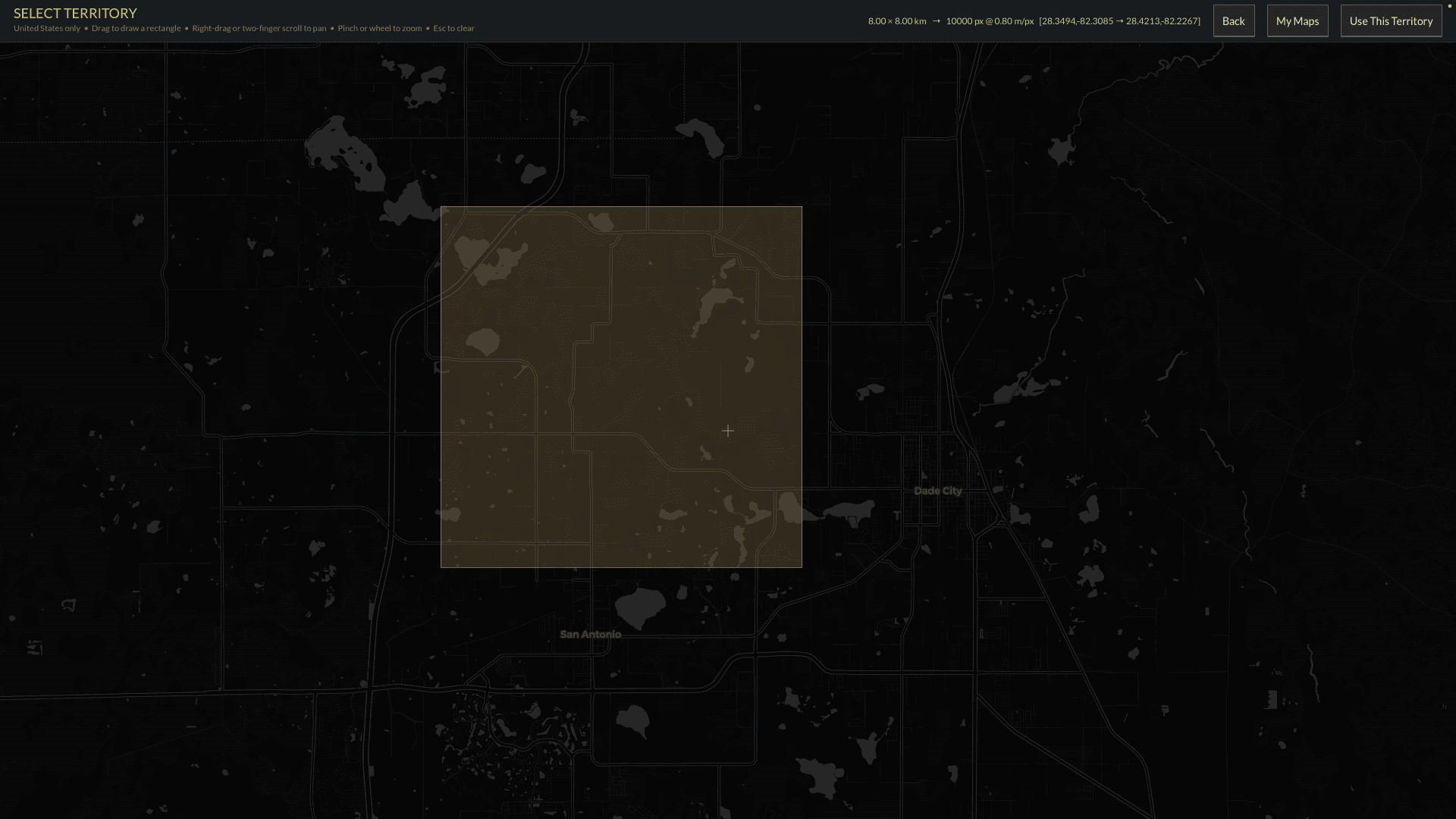
The Select Territory screen at game start. Drag a rectangle anywhere in the United States; the readout shows the box size and its real latitude and longitude, and "Use This Territory" builds the map from that exact ground.
| You pick | You get |
|---|---|
| A city and a neighborhood rectangle | A playable sector built from that exact ground |
| The starting block | Your first turf, with its real streets and buildings |
One bounding box at a time
You play one sector at a time: the bounding box you are in is the live, fully simulated map. The rest of the country is not loaded all at once; it streams in as you travel. This is what keeps a whole-country map performant.
Navigating the country
From your active sector you can travel to the adjacent real ground in any direction:
| Direction | You go to |
|---|---|
| North / South / East / West | The neighboring real-world slice of the city, fetched and cached on arrival |
- Each neighbor is the genuine adjacent patch of the real map, not a copy.
- Neighboring sectors render as ambient scenery at the edges, so the city feels continuous rather than walled.
- Visited sectors are cached, so returning is instant.
- As your organization grows, you push outward block by block and eventually across the country.
Map layers
The map carries toggleable overlays. Each answers a different strategic question:
| Layer | Shows | Read it to... |
|---|---|---|
| Zones / Sections | Neighborhood boundaries and type (residential, commercial, industrial, drug trade) | Know the character of each block |
| Heat | The per-section heat value (0 to 100) printed on each section | See exact police pressure per block |
| Crime Rate | The same heat values shaded as a color heatmap with a legend | See the pressure pattern across the map at a glance |
| For Sale | Properties currently on the market | Find real estate to acquire |
| My Properties | Everything you own | Manage your portfolio and income |
| Protection Rackets | Businesses marked for or paying protection | Track your racket income |
| Drug Corners | Your claimed corners and rival corners | Manage turf and demand (below) |
| Territory Push | Markers for where to pressure rivals | Direct your territory expansion |
| Minimap | A zoomed-out view of the sector | Orient quickly |
Territory: push and protect
The map is also your control surface for territory. Three tools matter:
| Tool | What it does |
|---|---|
| Drug Corners | Claim a corner to mark turf and pull addicts toward it, creating steady retail demand on ground you hold. Rival factions seed their own corners (shown in a rival color) that you can push against. |
| Territory Push markers | Flag where to apply pressure on a rival's bordering turf. Sustained presence there, unanswered, flips the section to you. |
| Protection | Mark a civilian business as a racket target to collect protection, shown on the rackets layer. |
These tie directly into Heat (dealing and extortion raise it), the Director (territorial pressure draws rival events), and the Economy (corners and rackets are income).
Modding
The streets, buildings, and water come from real map data at runtime, so mods do not redraw the map. Instead, mods ship fiction overlays: neighborhood names, gang turf, danger and mood, and spawn weighting, keyed to a location. You flavor the real world; you do not rebuild it. See Entities & Identities and Economy Config.
Related
- What you buy and build on the map: Real Estate & Assets
- The turf war the map visualizes: Territory
- The pressure overlay that drives police: Heat